Chapter 5. COM Servers
A Review of COM Servers
After you create one or more COM classes, you need to package the classes and install them on a system. The package is called a COM Server, which is a dynamically activated collection of the implementations of one or more COM classes. Modern Win32 versions of COM enable you to create a COM server as an in-process (inproc) server (a dynamic link library), an out-of-process server (an executable), or, on the Windows NT/2000/XP/2003 operating system, a system service executable. [1]
A COM server has three jobs, in addition to hosting the implementations of its classes:
Register and unregister all classes in the server and, potentially, the server itself.
Provide the COM Service Control Manager (SCM) access to all COM class objects implemented by the server (often called exposing the class objects). Class objects are frequently called class factory objects because they generally implement the
IClassFactoryinterface.Manage the server’s lifetime. This typically means allowing the SCM to unload an inproc server from memory when it’s no longer used. A local server often terminates when there are no more references to objects managed by the server.
Technically, the first and third items are optional, but all COM servers should implement this functionality. Exactly how a server does this depends on the type of server.
Inproc Servers
An inproc server is a dynamic link library (DLL) that contains five well-known entry points, one for the Win32 operating systems and the other four for COM:
1BOOL WINAPI DllMain(HINSTANCE hInstance, DWORD dwReason,
2    LPVOID lpReserved);
3
4STDAPI DllRegisterServer(void);
5STDAPI DllUnregisterServer(void);
6STDAPI DllGetClassObject(REFCLSID rclsid, REFIID riid,
7    LPVOID* ppv);
8STDAPI DllCanUnloadNow(void);
Each of the Win32 operating systems calls a
DLL’s DllMain function when it loads a DLL into a process
and removes a DLL from a process. The operating system also calls DllMain each time the current process creates a new thread
and when a thread terminates cleanly. This function is optional but
present in all ATL inproc servers.
The DllRegisterServer and DllUnregisterServer functions create and remove,
respectively, in the Windows Registry all entries necessary for the
correct operation of the server and its classes. When you use the
REGSVR32 utility to register or unregister an inproc server, the
utility loads the DLL and calls the appropriate one of these
function in the DLL. Technically, both of these functions are
optional, but, in practice, you want to have them in your
server.
The COM SCM calls a server’s DllGetClassObject function when it requires a class object
exposed by the server. The server should return the requested
interface, riid, on the specified class object, rclsid.
When you call the CoFreeUnusedLibraries API, COM asks each inproc server in your process whether COM should
unload the DLL by calling the DllCanUnloadNow function. An S_OK return value means that the server permits COM to
unload the server. An S_FALSE return value indicates that
the server is busy and COM cannot unload it.
Local Servers and Service-Based Servers
A local server or Windows service is an executable image (EXE) server that contains one well-known entry point:
1extern "C"
2int WINAPI _tWinMain(HINSTANCE hInstance,
3    HINSTANCE hPrevInstance, LPTSTR lpCmdLine, int nShowCmd);
Executables cannot provide multiple specialized entry points as DLLs can, so a local server must use a different technique to implement the three requirements of a COM server: registration, exposed class objects, and lifetime management.
A local server registers and unregisters itself,
and then immediately terminates when the server parses its command
line and finds the well-known (noncase-sensitive) command-line
switches Regserver and UnregServer,
respectively.
A local server exposes its class objects by
calling the CoRegisterClassObject API and handing an IUnknown interface pointer to each of the server’s class
objects to the SCM. A local server must call this API after the SCM
starts the server process. [2] When the server is ready to
shut down, it must first call CoRevokeClassObject to
notify the SCM that each of the server’s class objects is no longer
available for use.
A local server manages its own lifetime. When a server detects that there are no references to any of the objects managed by the server, the server can shut down – or not, as desired. As you’ll see later in this chapter, detecting that there are no references is a little trickier than you might think.
COM Createable and Noncreateable Classes
A COM createable
class is a COM object class that supports using the CoCreateInstance API to create instances. This implies
that the class must provide a class object and that the class
object implements the IClassFactory interface.
A noncreateable class typically provides no
class object, so calling CoCreateInstance using the
class’s CLSID fails. In many designs, far more noncreateable
classes exist than createable ones. For example, one version of
Microsoft Excel had approximately 130 classes, only 3 of which were
createable. You typically access interfaces on noncreateable
classes through properties or methods on createable classes or on
classes that have already been created by other means.
The Object Map and the CAtlModule Class
ATL uses two constructs to support the
functionality all types of servers require: the object map and one of three CAtlModule-derived classes. As you’ll see shortly, the
behavior of a COM server differs considerably depending upon
whether that server is an inproc server, a local server, or a
Windows service. ATL has factored server functionality into CAtlDllModuleT, CAtlExeModuleT, and CAtlServiceModuleT, each of which
extends the CAtlModule base class. The discussion that
follows refers to CAtlModule directly, but you should
realize that one of the derived classes actually does most of the
work. The object map (more properly entitled a class map) is a
table of all classes implemented in the server.
Various methods of the CAtlModule class
use the object map to do the following:
Find each class and ask it to register and unregister itself
Create the class object, if any, for each createable class
Register and unregister the class objects with the SCM
Find a table of implemented and required component categories for a class
Call the static initialization and termination member functions for each class
The basic idea is that you describe the classes
that you are implementing in a server using the object map.
Whenever you need basic server functionality, there is probably a
method of the CAtlModule class that implements much, if
not all, of the required functionality.
Many methods in the CAtlModule class
iterate over the entries in the object map and either ask each
class to perform the required function or ask each class to provide
the information needed to allow the method to do it.
The Object Map
ATL manages the object map by allocating a
custom data segment within the PE file itself. Each coclass adds an
entry to the object map by allocating the _ATL_OBJMAP_ENTRY structure (discussed in detail shortly)
within that same data segment. This produces a series of _ATL_OBJMAP_ENTRY structures that are contiguous in memory
and, thus, can easily be iterated over by CAtlModule when
it needs to perform registration, class object creation, and other
class-management services. Each class inserts an item into the
object map via the OBJECT_ENTRY_AUTO macro declared in the
class header file outside the class declaration itself, as in the
following:
1class CMyClass : public CComCoClass< ... >, ...
2{
3public:
4
5
6   ...
7};
8
9OBJECT_ENTRY_AUTO(__uuidof(MyClass), CMyClass)
Here the coclass name
declared in the IDL file is MyClass, so the __uuidof keyword returns the CLSID.
Readers familiar with previous versions of ATL
will recall that the object map was implemented as a global C++
object declared in the server’s .cpp file with macros such
as BEGIN_OBJECT_MAP and END_OBJECT_MAP. This
required each class to add information (namely, an OBJECT_ENTRY macro) to a separate header file not
associated with the class, which complicates maintenance and causes
every class in the server to be compiled twice. The nice thing
about the new approach is that the file in which the OBJECT_ENTRY_AUTO macro appears doesn’t matter; all
classes that declare one contribute entries that are contiguous in
memory. This means that information about each class can be located
next to the class definition, where it logically belongs. The
discussion of the OBJECT_ENTRY_AUTO macro later in this
chapter reveals how ATL accomplishes this nifty trick.
The Object Map Macros
_ATL_OBJMAP_ENTRY Structure
The object map is an array of _ATL_OBJMAP_ENTRY structures that look like this:
 1struct _ATL_OBJMAP_ENTRY30 {
 2    const CLSID* pclsid;
 3    HRESULT (WINAPI *pfnUpdateRegistry)(BOOL bRegister);
 4    _ATL_CREATORFUNC* pfnGetClassObject;
 5    _ATL_CREATORFUNC* pfnCreateInstance;
 6    IUnknown* pCF;
 7    DWORD dwRegister;
 8    _ATL_DESCRIPTIONFUNC* pfnGetObjectDescription;
 9    _ATL_CATMAPFUNC* pfnGetCategoryMap;
10    void (WINAPI *pfnObjectMain)(bool bStarting);
11};
12
13
14typedef _ATL_OBJMAP_ENTRY30 _ATL_OBJMAP_ENTRY;
The structure contains the following fields, many of which are pointers to functions:
Field |
Description |
|---|---|
|
Pointer to CLSID for this class entry |
|
The function that registers and unregisters the class |
|
The Creator function that creates an instance of the class object |
|
The Creator function that creates an instance of the class |
|
Pointer to the class object instance – |
|
Registration cookie |
|
The function that returns the object description for the class |
|
The function that returns the component category map |
|
The class initialization/termination function |
OBJECT_ENTRY_AUTO Macro
You use the OBJECT_ENTRY_AUTO macro to
specify a COM-createable class. Typically, this means the specified
class derives from the CComCoClass base class. Often these
are top-level objects in an object model. Clients typically create
such top-level objects using CoCreateInstance.
 1#define OBJECT_ENTRY_AUTO(clsid, class) \
 2    __declspec(selectany) ATL::_ATL_OBJMAP_ENTRY \
 3    __objMap_##class = \
 4    {&clsid, class::UpdateRegistry, \
 5    class::_ClassFactoryCreatorClass::CreateInstance, \
 6    class::_CreatorClass::CreateInstance, NULL, 0, \
 7    class::GetObjectDescription, class::GetCategoryMap, \
 8    class::ObjectMain }; \
 9    extern "C" __declspec(allocate("ATL$__m"))\
10    __declspec(selectany) \
11    ATL::_ATL_OBJMAP_ENTRY* const __pobjMap_##class = \
12    &__objMap_##class; \
13    OBJECT_ENTRY_PRAGMA(class)
A key part of the previous OBJECT_ENTRY_AUTO macro definition is the __declspec(allocate) modifier used to allocate an item of
type _ATL_OBJMAP_ENTRY in a data segment named ATL$__m. All classes in the server use this same macro (or
the NON_CREATEABLE version discussed shortly), so they all
add items to the same contiguous ATL$__m data segment,
which lays out the _ATL_OBJMAP_ENTRY structures
contiguously in memory. The OBJECT_ENTRY_PRAGMA is the bit
that actually forces the linker to include a symbol pointing to the _ATL_OBJMAP_ENTRY. OBJECT_ENTRY_PRAGMA is defined
as follows:
1#if defined(_M_IX86)
2#define OBJECT_ENTRY_PRAGMA(class)
3  __pragma(comment(linker,"/include:___pobjMap_" #class));
4...
5#endif
The pragma shown in the macro
definition has the same effect as passing the /include option to the command line of the linker. You might have noticed
the __declspec(selectany) attribute adorning the __objMap_##class and __pobj-Map_##class variables
in the OBJECT_ENTRY_AUTO macro. This construct appears in
many places in ATL, and it’s convenient because it instructs the
linker to ignore multiple definitions of a global data item that it
finds in a single object file. For instance, if more than one .cpp file included a class definition that contained the OBJECT_ENTRY_AUTO macro, both expansions of the __objMap_##class and __pobj-Map_##class globals
would be defined multiple times and would produce linker
errors.
Having each _ATL_OBJMAP_ENTRY from
every class aligned contiguously in memory is part of what’s needed
to build an object map that CAtlModule can iterate over.
The remaining parts are pointers that mark where in memory the map
starts and where it ends. ATL is clever here as well. It creates
two additional data segments named ATL$__a and ATL$__z and allocates a single NULL _ATL_OBJMAP_ENTRY pointer within each. The linker then
arranges the three data segments alphabetically so that the ATL$__m segment containing all the server’s _ATL_OBJMAP_ENTRY structures is sandwiched between two NULL s. The code in atlbase.h that does this is
shown here:
 1#pragma section("ATL$__a", read, shared)
 2#pragma section("ATL$__z", read, shared)
 3#pragma section("ATL$__m", read, shared)
 4extern "C" {
 5__declspec(selectany) __declspec(allocate("ATL$__a"))
 6    _ATL_OBJMAP_ENTRY* __pobjMapEntryFirst = NULL;
 7__declspec(selectany) __declspec(allocate("ATL$__z"))
 8    _ATL_OBJMAP_ENTRY* __pobjMapEntryLast = NULL;
 9}
10
11#if !defined(_M_IA64)
12#pragma comment(linker, "/merge:ATL=.rdata")
13#endif
The alphabetical order of sections in the
resulting file is guaranteed through a special naming rule enforced
by the linker. If a section name has a $ character in it,
the linker goes through some odd but, in this case, useful
gyrations. First, it arranges the segments in order alphabetically.
Then, it strips the $ character and all characters after
the $ in the section name and merges the sections. This
way, you’re guaranteed that the data in the ATL$__a segment comes first, then the ATL$__m segment comes next,
and finally the ATL$__z segment. The actual linked PE
format file then would have a single ATL segment instead of three
separate ones. [3]
The final step is the /merge switch
added by the final #pragma directive. This causes
everything in the ATL segment to be merged into the standard .rdata section (which explains why you won’t find the ATL
section if you go looking with dumpbin).
Take a look at the following three class definitions:
 1class CDog : public CComCoClass< ... >, ...
 2{ };
 3OBJECT_ENTRY_AUTO(__uuidof(Dog), CDog)
 4
 5class CCat: public CComCoClass< ... >, ...
 6{ };
 7OBJECT_ENTRY_AUTO(__uuidof(Cat), CCat)
 8
 9class CMouse: public CComCoClass< ... >, ...
10{ };
11OBJECT_ENTRY_AUTO(__uuidof(Mouse), CMouse)
The actual layout of the object map in memory looks something like Figure5.1.
Figure 5.1. The ATL object map
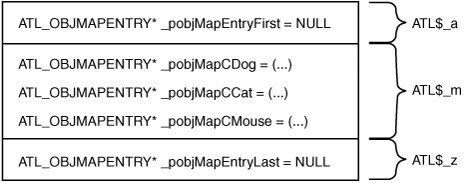
The beginning of the map is
marked by _pobjMapEntryFirst and its value is set to NULL. It’s not possible to set _pobjMapEntryFirst to one of the first “real” entries in the map because each is a
global object, and the order of global object construction in C++
is not guaranteed. As you’ll see later when we peer into the CAtlModule-derived classes, all these classes must do to
walk the object map is start at __pobjMapEntryFirst and
increment a pointer until that pointer is NULL.
OBJECT_ENTRY_NON_CREATEABLE_EX_AUTO macro
You use the OBJECT_ENTRY_NON_CREATEABLE_EX_AUTO macro to specify a
class that does not have an associated class object. Often these
are non-top-level objects in an object model. Clients typically
must call a method on a higher-level object in the object hierarchy
to obtain an instance of this class. Because the specified class
does not have an associated class object, clients cannot create an
instance by calling CoCreateInstance.
 1#defineOBJECT_ENTRY_NON_CREATEABLE_EX_AUTO(clsid, class) \
 2    __declspec(selectany) ATL::_ATL_OBJMAP_ENTRY \
 3    __objMap_##class = \
 4    {&clsid, class::UpdateRegistry, NULL, NULL, NULL, 0, NULL, \
 5    class::GetCategoryMap, class::ObjectMain }; \
 6    extern "C"  __declspec(allocate("ATL$__m" )) \
 7    __declspec(selectany) \
 8    ATL::_ATL_OBJMAP_ENTRY* const __pobjMap_##class = \
 9    &__objMap_##class; \
10    OBJECT_ENTRY_PRAGMA(class)
You use the OBJECT_ENTRY_NON_CREATEABLE_EX_AUTO macro primarily for
noncreateable classes that need class-level initialization and
uninitialization. Occasionally, you might want to have a
noncreateable class maintain Registry entries, possibly persistent
class configuration information and component categories.
Methods Required of an Object Map Class
The CAtlModule class registers, unregisters, initializes, and uninitializes
noncreateable object map entries. In addition, it creates class
objects and class instances for regular object map entries.
A class listed in the object map using the OBJECT_ENTRY_NON_CREATEABLE_EX_AUTO macro must provide the
first three well-known static methods listed in Table 5.1. A class listed in the object map
that uses the OBJECT_ENTRY_AUTO macro must provide the
same three methods as a noncreateable class, plus the additional
well-known static methods listed in Table 5.1.
Table 5.1. Object Map Support Functions
Static Member Function |
Description |
|---|---|
|
Registers and unregisters the class. The |
|
Initializes and uninitializes the class. |
|
Returns a pointer to a component category map. The
|
|
The |
|
The |
|
Returns the object description text string. |
All
classes listed in the object map must define an UpdateRegistry method, which is the only method not
provided by any base class. As you’ll see soon, ATL contains
various macros that expand to different implementations of this
method, so the method is not difficult to provide.
All ATL objects derive from CComObjectRootBase, so they already have a default
implementation of the ObjectMain method.
Most createable ATL classes also derive from CComCoClass, which provides the implementation of all four
remaining methods that an object map entry requires, as well as
both of the required typedefs. ATL also contains a set of macros
that define and implement GetCategoryMap.
Class Registration Support Methods
When a server registers all the COM classes it
contains, ATL iterates over the object map. The pfnUpdateRegistry field in the object map contains a
pointer to the class’s UpdateRegistry method. For each
entry, ATL calls the UpdateRegistry method to register or
unregister the class. Then, it registers or unregisters the
component categories for the class using the table of required and
implemented categories that the GetCategoryMap method
provides.
The GetObjectDescription Method
The GetObjectDescription static method
retrieves the text description for your class object. As shown
previously, the default implementation returns NULL. You
can override this method with the DECLARE_OBJECT_DESCRIPTION macro. For example:
1class CMyClass : public CComCoClass< ... >, ... {
2public:
3   DECLARE_OBJECT_DESCRIPTION("MyClass Object Description")
4
5   ...
6};
The UpdateRegistry Method
Every class that you list in the object map,
whether createable or noncreateable, must provide an UpdateRegistry static member function. The ATL server
implementation calls this method to ask the class to register and
unregister itself, depending on the value of bRegister.
1static HRESULT WINAPI UpdateRegistry(BOOL bRegister) ;
When you ask a COM server to register its classes,
it registers all of them. You can’t ask a server to register just
one class or some subset of its classes. To register or unregister
a subset of the classes in a server, you need to provide a
Component Registrar object. This is a COM-createable class that
implements the IComponentRegistrar interface. At one
time, Microsoft Transaction Server was going to use the Component
Registrar object to register and unregister individual classes in a
server. However, I can find no references describing if, when, or
how MTS/COM+ uses the Component Registrar object. Basically, as of
this writing, the Component Registrar object and class object
descriptions seem to be an unused feature, and you shouldn’t use
them.
The DECLARE_REGISTRY Macros
You can provide a custom implementation of UpdateRegistry (a.k.a. write it yourself) or use an
ATL-provided implementation. ATL provides an implementation of this
method when you use one of the following macros in your class
declaration:
 1#define DECLARE_NO_REGISTRY() \
 2    static HRESULT WINAPI UpdateRegistry(BOOL /*bRegister*/) \
 3    {return S_OK;}
 4
 5
 6#define DECLARE_REGISTRY(class, pid, vpid, nid, flags)\
 7    static HRESULT WINAPI UpdateRegistry(BOOL bRegister) {\
 8        return _Module.UpdateRegistryClass(GetObjectCLSID(), \
 9           pid, vpid, nid,\
10           flags, bRegister);\
11    }
12
13
14#define DECLARE_REGISTRY_RESOURCE(x)\
15    static HRESULT WINAPI UpdateRegistry(BOOL bRegister) {\
16    ...
17    return ATL::_pAtlModule->UpdateRegistryFromResource(_T(#x), \
18        bRegister); \
19    ...
20    }
21
22
23#define DECLARE_REGISTRY_RESOURCEID(x)\
24    static HRESULT WINAPI UpdateRegistry(BOOL bRegister) {\
25    ...
26    return ATL::_pAtlModule->UpdateRegistryFromResource(x, \
27        bRegister); \
28    ...
29    }
In
most circumstances, you shouldn’t use two of these Registry macros.
The DECLARE_REGISTRY macro relies upon the old
ATL 3 CComModule class to do its work. CComModule is no longer used as of ATL 7; if you try to use DECLARE_REGISTRY in an ATL 7 or 8 project, you’ll see
compile errors resulting from references to the deprecated CComModule class. Unless you’re porting an ATL 3 project
to ATL 7+, you should not use DECLARE_REGISTRY.
The second Registry macro to steer clear of is
the DECLARE_NO_REGISTRY macro. This macro simply returns S_OK from the UpdateRegistry method, so no class
information is entered in the Registry. The intent was that
noncreateable classes can’t be created, so you shouldn’t put their
CLSID information in the Registry. The problem is that any class
that wants to throw COM exceptions still needs the CLSID-ProgId
association in the Registry. ATL’s support code for populating COM
exception objects relies upon the ProgIdFromCLSID function, which fails for any class that uses DECLARE_NO_REGISTRY.
The most flexible registration technique for ATL
servers is to use Registry scripts. When asked to register or
unregister, a server using Registry scripts uses an interpreter
object to parse the script and make the appropriate Registry
changes. The interpreter object implements the IRegistrar interface. ATL provides such an object, which can be either
statically linked to reduce dependencies or dynamically loaded for
the smallest code size. The choice is made via the _ATL_STATIC_REGISTRY macro, which is discussed later in
this chapter.
The DECLARE_REGISTRY_RESOURCE and DECLARE_REGISTRY_RESOURCEID macros provide an
implementation of UpdateRegistry that delegates the call
to the CAtlModule::UpdateRegistryFromResource method. You
specify a string resource name when you use the first macro. The
second macro expects an integer resource identifier. The UpdateRegistryFromResource runs the script contained in
the specified resource. When bRegister is TRUE,
this method adds the script entries to the system Registry;
otherwise, it removes the entries.
Registry Script Files
Registry scripts are text files that specify
what Registry changes must be made for a given CLSID.
Wizard-generated code uses an RGS extension by default for
Registry script files. Your server contains the script file as a
custom resource of type REGISTRY in your executable or
DLL.
Registry script syntax isn’t complicated; it can be summarized as follows:
1[NoRemove | ForceRemove | val] Name [ = s | d | m | b 'Value']
2{
3  ... optional script entries for subkeys
4}
The NoRemove prefix specifies that the
parser should not remove the key when unregistering. The ForceRemove prefix specifies that the parser should remove
the current key and any subkeys before writing the key. [4] The val prefix specifies that the entry is a named value, not
a key. The s and d value prefixes indicate REG_SZ and REG_DWORD, respectively. The m value prefix indicates a multistring
(REG_MULTI_SZ), and the b value prefix denotes a
binary value (REG_BINARY). The Name token is the
string for the named value or key. It must be surrounded by
apostrophes when the string contains spaces; otherwise, the
apostrophes are optional. ATL’s parser recognizes the standard
Registry keys – for example, HKEY_CLASSES_ROOT – as well as
their four character abbreviations (HKCR).
Here’s a REGEDIT4 sample for the
nontrivial class registration for a sample class named Demagogue. Watch out: A few lines are too long to list on
the page and have wrapped.
 1REGEDIT4
 2[HKEY_CLASSES_ROOT\ATLInternals.Demagogue.1]
 3@="Demagogue Class"
 4[HKEY_CLASSES_ROOT\ATLInternals.Demagogue.1\CLSID]
 5@="{95CD3731-FC5C-11D1-8CC3-00A0C9C8E50D}"
 6[HKEY_CLASSES_ROOT\ATLInternals.Demagogue]
 7@="Demagogue Class"
 8[HKEY_CLASSES_ROOT\ATLInternals.Demagogue\CLSID]
 9@="{95CD3731-FC5C-11D1-8CC3-00A0C9C8E50D}"
10[HKEY_CLASSES_ROOT\ATLInternals.Demagogue\CurVer]
11@="ATLInternals.Demagogue.1"
12[HKEY_CLASSES_ROOT\CLSID\{95CD3731-FC5C-11D1-8CC3-00A0C9C8E50D}]
13@="Demagogue Class"
14[HKEY_CLASSES_ROOT\CLSID\{95CD3731-FC5C-11D1-8CC3-00A0C9C8E50D}\ProgID]
15@="ATLInternals.Demagogue.1"
16[HKEY_CLASSES_ROOT\CLSID\{95CD3731-FC5C-11D1-8CC3-00A0C9C8E50D}\VersionIndependentProgID]
17@="ATLInternals.Demagogue"
18[HKEY_CLASSES_ROOT\CLSID\{95CD3731-FC5C-11D1-8CC3-00A0C9C8E50D}\Programmable]
19[HKEY_CLASSES_ROOT\CLSID\{95CD3731-FC5C-11D1-8CC3-00A0C9C8E50D}\InprocServer32]
20@="C:\\ATLINT~1\\Debug\\ATLINT~1.DLL"
21"ThreadingModel"="Apartment"
22[HKEY_CLASSES_ROOT\CLSID\{95CD3731-FC5C-11D1-8CC3-00A0C9C8E50D}\TypeLib]
23@="{95CD3721-FC5C-11D1-8CC3-00A0C9C8E50D}"
24[HKEY_CLASSES_ROOT\CLSID\{95CD3731-FC5C-11D1-8CC3-00A0C9C8E50D}\Implemented
25Categories]
26[HKEY_CLASSES_ROOT\CLSID\{95CD3731-FC5C-11D1-8CC3-00A0C9C8E50D}\Implemented
27Categories\{0D22FF22-28CC-11D2-ABDD-00A0C9C8E50D}]
The corresponding Registry script looks like this:
 1HKCR
 2{
 3  ATLInternals.Demagogue.1 = s 'Demagogue Class'
 4  {
 5    CLSID = s '{95CD3731-FC5C-11D1-8CC3-00A0C9C8E50D}'
 6  }
 7  ATLInternals.Demagogue = s 'Demagogue Class'
 8  {
 9    CLSID = s '{95CD3731-FC5C-11D1-8CC3-00A0C9C8E50D}'
10    CurVer = s 'ATLInternals.Demagogue.1'
11  }
12  NoRemove CLSID
13  {
14    ForceRemove {95CD3731-FC5C-11D1-8CC3-00A0C9C8E50D} = s 'Demagogue
15      Class'
16    {
17      ProgID = s 'ATLInternals.Demagogue.1'
18      VersionIndependentProgID = s 'ATLInternals.Demagogue'
19      ForceRemove 'Programmable'
20      InprocServer32 = s '%MODULE%'
21      {
22        val ThreadingModel = s 'Apartment'
23      }
24      'TypeLib' = s '{95CD3721-FC5C-11D1-8CC3-00A0C9C8E50D}'
25      'Implemented Categories'
26      {
27        {0D22FF22-28CC-11D2-ABDD-00A0C9C8E50D}
28      }
29    }
30  }
31}
When you have the resource script file, you
reference the file in your server’s resource (.rc) file.
You can reference it using either an integer identifier or a string
identifier. In a typical ATL project, each class can have a
Registry script file, and the server as a whole typically has its
own unique Registry script file.
In the following examples, the Demagogue script file uses the integer identifier IDR_DEMAGOGUE. The EarPolitic script file uses EARPOLITIC as its
string identifier. ATL wizard-created classes use the DECLARE_REGISTRY_RESOURCEID macro to specify a resource by
its integer identifier. You can use the DECLARE_REGISTRY_RESOURCE macro to identify a resource by
its name.
 1// resource.h file
 2#define IDR_DEMAGOGUE                   102
 3
 4// Server.rc file
 5IDR_DEMAGOGUE           REGISTRY DISCARDABLE    "Demagogue.rgs"
 6EARPOLITIC              REGISTRY DISCARDABLE    "EarPolitic.rgs"
 7
 8// Demagogue.h file
 9class ATL_NO_VTABLE CDemagogue :
10    public CComObjectRootEx<CComSingleThreadModel>,
11    public CComCoClass<CDemagogue, &CLSID_Demagogue>,
12
13...
14public:
15DECLARE_REGISTRY_RESOURCEID(IDR_DEMAGOGUE)
16
17...
18};
19
20// EarPolitic.h file
21class ATL_NO_VTABLE CEarPolitic :
22    public CComObjectRootEx<CComSingleThreadModel>,
23    public CComCoClass<CEarPolitic, &CLSID_EarPolitic>,
24
25...
26{
27public:
28DECLARE_REGISTRY_RESOURCE(EARPOLITIC)
29...
30};
Registry Script Variables
Note that in the Registry script, one of the
lines references a symbol called %MODULE%.
1InprocServer32 = s '%MODULE%'
When the parser evaluates the script, it
replaces all occurrences of the Registry script variable %MODULE% with the actual results of a call to GetModuleFileName. So what the parser actually registered
looked like this:
1InprocServer32 = s 'C:\ATLInternals\Debug\ATLInternals.dll'
You can use additional, custom Registry script variables in your scripts. Your server must provide the Registry script parser with a table that maps variable names to replacement values when you ask the parser to parse the script. The parser substitutes the replacement values for the variable names before registration.
To use custom Registry script variables, first select the Registry script variable name, using percent signs to delimit the name. Here is a sample line from a Registry script:
1DateInstalled = s '%INSTALLDATE%'
You now have two choices. If your script
variables are global, you can provide an override of the AddCommonRGSReplacements method in your derived module
class. An example implementation looks like this:
1HRESULT AddCommonRGSReplacements(IRegistrarBase *pRegistrar) {
2    BaseModule::AddCommonRGSReplacements( pRegistrar );
3    OLECHAR wszDate [16]; SYSTEMTIME st;
4    GetLocalTime(&st);
5    wsprintfW(wszDate, L"%.4d/%.2d/%.2d", st.wYear,
6        st.wMonth, st.wDay);
7    pRegistrar->AddReplacement( OLESTR("INSTALLDATE"), wszDate );
8}
You must call the base class’s version of AddCommonRGSReplacements to make sure the APPID variable gets added as well.
If you don’t want to have all of your
replacements added in one place, you can define a custom UpdateRegistry method instead of using the DECLARE_REGISTRY_RESOURCEID macro in your class. In the
method, build a table of replacement name-value pairs. Finally,
call the CAtlModule::UpdateRegistryFromResource method,
specifying the resource identifier, a register/unregister flag, and
a pointer to the replacement name-value table. Note that ATL uses
the provided table entries in addition
to the default replacement map (which, as of this writing,
contains only %MODULE% and %APPID%).
Here is an example from the Demagogue class that substitutes the variable %INSTALLDATE% with a
string that contains the current date:
 1static HRESULT WINAPI UpdateRegistry(BOOL b) {
 2    OLECHAR wszDate [16]; SYSTEMTIME st;
 3    GetLocalTime(&st);
 4    wsprintfW(wszDate, L"%.4d/%.2d/%.2d", st.wYear,
 5        st.wMonth, st.wDay);
 6    _ATL_REGMAP_ENTRY rm[] = {
 7        { OLESTR("INSTALLDATE"), wszDate},
 8        { 0, 0 } };
 9    return _pAtlModule->UpdateRegistryFromResource(
10        IDR_DEMAGOGUE, b, rm);
11}
After registration of the class, the Registry key DateInstalled contains the year, month, and day, in the
form yyyy/mm/dd, at the time of install.
The GetCategoryMap Method
The last step in the registration process for
each class in the object map is to register the component
categories for the class. The ATL server registration code calls
each class’s GetCategoryMap method to ask the class for
its list of required and implemented component categories. The
method looks like this:
1static const struct _ATL_CATMAP_ENTRY* GetCategoryMap() { return NULL; }
The ATL server registration code uses the
standard component category manager object
(CLSID_StdComponentCategoriesMgr) to register your class’s
required and implemented categories. Older versions of Win32
operating systems do not have this component installed. When the
category manager is not installed, your class’s registration of its
component categories silently fails. Typically, this is not good.
However, Microsoft permits you to redistribute the standard
component category manager (comcat.dll) with your
application.
The Component Category Map
Typically, you use ATL-provided category map macros for the implementation of this method. Here’s a typical category map:
1// {0D22FF22-28CC-11d2-ABDD-00A0C9C8E50D}
2static const GUID CATID_ATLINTERNALS_SAMPLES =
3{0xd22ff22, 0x28cc, 0x11d2, {0xab, 0xdd, 0x0, 0xa0, 0xc9, 0xc8,
4     0xe5, 0xd}};
5
6BEGIN_CATEGORY_MAP(CDemagogue)
7IMPLEMENTED_CATEGORY(CATID_ATLINTERNALS_SAMPLES)
8END_CATEGORY_MAP()
This example defines a component category called CATID_ATLINTERNALS_SAMPLES. All examples in this book
register themselves as a member of this category.
The Category Map Macros
The BEGIN_CATEGORY_MAP macro declares the GetCategoryMap static member function. This returns a
pointer to an array of _ATL_CATMAP_ENTRY enTRies, each of
which describes one component category that your class either
requires or implements.
1#define BEGIN_CATEGORY_MAP(x)\
2    static const struct ATL::_ATL_CATMAP_ENTRY* GetCategoryMap() {\
3    static const struct ATL::_ATL_CATMAP_ENTRY pMap[] = {
The IMPLEMENTED_CATEGORY and REQUIRED_CATEGORY macros populate the table with the
appropriate entries:
1#define IMPLEMENTED_CATEGORY(catid) { \
2    _ATL_CATMAP_ENTRY_IMPLEMENTED, &catid },
3#define REQUIRED_CATEGORY(catid) { \
4    _ATL_CATMAP_ENTRY_REQUIRED, &catid },
The END_CATEGORY_MAP adds a delimiting
entry to the table and completes the GetCategoryMap function:
1#define END_CATEGORY_MAP()\
2    { _ATL_CATMAP_ENTRY_END, NULL } };\
3    return( pMap ); }
Each table entry contains a flag (indicating whether the entry describes a required category, an implemented category, and the end of table entry) and a pointer to the CATID.
1struct _ATL_CATMAP_ENTRY {
2    int iType;
3    const CATID* pcatid;
4};
5
6
7#define _ATL_CATMAP_ENTRY_END         0
8#define _ATL_CATMAP_ENTRY_IMPLEMENTED 1
9#define _ATL_CATMAP_ENTRY_REQUIRED    2
The ATL helper function AtlRegisterClassCategoriesHelper iterates through the
table and uses COM’s standard component category manager to
register each CATID as a required or implemented category for your
class. The ATL server registration code uses this helper function
to register the component categories for each class in the object
map.
Unfortunately, the category
map logic does not add a category to a system before trying to
enroll a class as a member of the (nonexistent) category. If you
want to add categories that don’t already exist, you must enhance
the registration of the server itself so that it registers any
custom component categories your classes use. For example, the
following Registry script registers the AppID for an
inproc server and also adds a component category to the list of
component categories on the system:
 1HKCR
 2{
 3    NoRemove AppID
 4    {
 5        {A11552A2-28DF-11d2-ABDD-00A0C9C8E50D} = s 'ATLInternals'
 6        'ATLInternals.DLL'
 7        {
 8            val AppID = s {A11552A2-28DF-11d2-ABDD-00A0C9C8E50D}
 9
10        }
11    }
12    NoRemove 'Component Categories'
13    {
14        {0D22FF22-28CC-11d2-ABDD-00A0C9C8E50D}
15        {
16            val 409 = s 'ATL Internals Example Components'
17        }
18    }
19}
This technique defines all categories (just one in the previous example) that the classes implemented in this server in the System registry use. Separately, each class registers itself as a member of one or more of these categories.
Server, Not Class, Registration
Often, you need Registry entries for the server
(inproc, local, or service) as a whole. For example, the HKCR/AppID Registry entries for a server apply to the
entire DLL or EXE, and not to a specific class implemented in the
DLL or EXE. As mentioned previously, you must register a new
component category with the system before you can enroll a class as
a member of the category. Until now, you’ve only seen support for
registration of class-specific information.
This is simple enough. Write a Registry script
that adds the entries the server requires, such as its AppID and component categories that the server’s classes
use. Then, register the server’s script before registering all the
classes implemented inthe server. The
wizard-generated code for all three server types does precisely
this for you.
The ATL wizard-generated code for a server
creates a Registry script file for your server registration in addition to any
Registry script files for your classes. By default, the server
Registry script defines only an AppID for the server. Here
are the entries for an ATL project called MathServer:
 1// In the resource.h file
 2#define IDR_MATHSERVER        100
 3
 4// In the MathServer.rc file
 5IDR_MATHSERVER REGISTRY "MathServer.rgs"
 6
 7// MathServer.rgs file
 8HKCR
 9{
10    NoRemove AppID
11{
12        '%APPID%' = s 'MathServer'
13        'MathServer.DLL'
14        {
15            val AppID = s '%APPID%'
16        }
17    }
18}
The RGS files are similar for all three server types – inproc, local server, and Windows service. The mechanics used to invoke the registration code that executes the script differ among the three server types.
Inproc Server Registration
Inproc server registration for classes and for
the server itself occurs in the call to the DllRegisterServer entry point. This method delegates the
work to a specialization of CAtlModule that is used only
for inproc servers; this class is called CAtlDllModuleT.
 1template <class T>
 2class ATL_NO_VTABLE CAtlDllModuleT : public CAtlModuleT<T> {
 3public:
 4    ...
 5    HRESULT DllRegisterServer(BOOL bRegTypeLib = TRUE) {
 6        ...
 7        T* pT = static_cast<T*>(this);
 8        HRESULT hr = pT->RegisterAppId(); // execute server script
 9        ...
10        return hr;
11    }
12    ...
13};
The RegisterAppId function ultimately calls the UpdateRegistryFromResource function through the UpdateRegistryAppId helper generated by the DECLARE_REGISTRY_APPID_RESOURCEID macro in our project.cpp file. This macro is discussed in more detail
later in this chapter.
Local Server and Windows Service Registration
A local server specializes CAtlModule with a class called CAtlExeModuleT. A Windows service
further extends CAtlExeModuleT with a derived class called CAtlServiceModuleT. Both classes supply WinMain code that registers the server’s resource script entries and then
calls the _AtlModule object’s RegisterServer method to do the same for each class in the object map. These
classes unregister each object in the server before running the
server’s unregistration script.
 1template <class T>
 2class CAtlExeModuleT : public CAtlModuleT<T> {
 3public :
 4
 5  int WinMain(int nShowCmd) throw() {
 6    ...
 7    HRESULT hr = S_OK;
 8
 9    LPTSTR lpCmdLine = GetCommandLine();
10    if (pT->ParseCommandLine(lpCmdLine, &hr) == true)
11      hr = pT->Run(nShowCmd);
12
13      ...
14  }
15
16  bool ParseCommandLine(LPCTSTR lpCmdLine, HRESULT* pnRetCode) {
17    *pnRetCode = S_OK;
18
19    TCHAR szTokens[] = _T("-/");
20
21    T* pT = static_cast<T*>(this);
22    LPCTSTR lpszToken = FindOneOf(lpCmdLine, szTokens);
23    while (lpszToken != NULL) {
24      if (WordCmpI(lpszToken, _T("UnregServer"))==0) {
25        *pnRetCode = pT->UnregisterServer(TRUE); // all class script
26        if (SUCCEEDED(*pnRetCode))
27          *pnRetCode = pT->UnregisterAppId(); //  server scripts
28        return false;
29      }
30
31      // Register as Local Server
32      if (WordCmpI(lpszToken, _T("RegServer"))==0) {
33        *pnRetCode = pT->RegisterAppId(); // server script
34        if (SUCCEEDED(*pnRetCode))
35          *pnRetCode = pT->RegisterServer(TRUE); // all class scripts
36        return false;
37      }
38
39      lpszToken = FindOneOf(lpszToken, szTokens);
40    }
41
42    return true;
43  }
44};
Class Initialization and Uninitialization
The ObjectMain Method
In C++, constructors and
destructors are used to provide instance-level initialization and
cleanup – that is, code that runs each time an instance of a class is
either created or destroyed. Often, it is useful to provide
class-level initialization and cleanup codecode that runs only once
per class, regardless of the number of class instances that are
ultimately created. Some languages support such behavior directly
through static constructors. Unfortunately, C++ is not one of those
languages. So, ATL supports class-level initialization for all
classes listed in the object map, createable and noncreateable,
through the ObjectMain method. In fact, you’ll frequently
add a noncreateable class entry to the object map solely because
the noncreateable class needs class-level initialization. (A
createable class must always be in the object map and thus always
receives class-level initialization.)
When an ATL server initializes, it iterates over
the object map and calls the ObjectMain static member
function (with the bStarting parameter set to true) of each class in the map. When an ATL server
terminates, it calls the ObjectMain function (with the bStarting parameter set to false) of each class
in the map. Youalways have a default implementation, provided by CComObjectRootBase, that does nothing and looks like
this:
1static void WINAPI ObjectMain(bool /* bStarting */ ) {};
When you have class initialization and
termination logic (compared to instance initialization and
termination logic), define an ObjectMain static member
function in your class and place the logic there. [5]
1class ATL_NO_VTABLE CSoapBox :
2    public CComObjectRootEx<CComSingleThreadModel>,
3    ...
4{
5public:
6    DECLARE_NO_REGISTRY()
7    ...
8    static void WINAPI ObjectMain(bool bStarting) ;
9};
Instantiation Requests
Having class initialization logic run may be useful, but if clients can’t create an instance, an initialized class is no help. Next, let’s look at how ATL supports creating COM class factories to bring your COM objects to life.
Class Object Registration
ATL creates the class objects for an inproc
server slightly differently than it does the class objects for a
local server or service. For an inproc server, ATL defers creating
each class object until the SCM actually requests the class object
via DllGetClassObject. For a local server or service, ATL
creates all class objects during server initialization and then
registers the objects with the SCM.
For an inproc server, ATL uses the AtlComModuleGetClassObject helper function to scan the
object map; create the class object, if necessary; and return the
requested interface on the class object.
 1ATLINLINE ATLAPI AtlComModuleGetClassObject(
 2       _ATL_COM_MODULE* pComModule, REFCLSID rclsid, REFIID riid,
 3       LPVOID* ppv) {
 4    ...
 5    for (_ATL_OBJMAP_ENTRY** ppEntry =
 6        pComModule->m_ppAutoObjMapFirst;
 7        ppEntry < pComModule->m_ppAutoObjMapLast; ppEntry++) {
 8        if (*ppEntry != NULL) {
 9            _ATL_OBJMAP_ENTRY* pEntry = *ppEntry;
10            if ((pEntry->pfnGetClassObject != NULL) &&
11                InlineIsEqualGUID(rclsid, *pEntry->pclsid)) {
12                if (pEntry->pCF == NULL) {
13                    CComCritSecLock<CComCriticalSection>
14                        lock(pComModule->m_csObjMap, false);
15                    hr = lock.Lock();
16                    ...
17                    if (pEntry->pCF == NULL)
18                        hr = pEntry->pfnGetClassObject(
19                            pEntry->pfnCreateInstance,
20                            __uuidof(IUnknown),
21                            (LPVOID*)&pEntry->pCF);
22                }
23                if (pEntry->pCF != NULL)
24                    hr = pEntry->pCF->QueryInterface(riid, ppv);
25                break;
26            }
27        }
28    }
29    if (*ppv == NULL && hr == S_OK)
30        hr = CLASS_E_CLASSNOTAVAILABLE;
31    return hr;
32}
Notice how the logic checks to see if the class
object has not already been created (pEntry->pCF == NULL), acquires the critical section that guards access to the
object map, and then checks once more that pCF is still NULL. What might not be obvious is why ATL checks twice.
This is to maximize concurrency by avoiding grabbing the critical
section in the normal case (when the class factory has already been
created).
Also notice that ATL caches the IUnknown interface for the class object in the object map
entry’s pCF member variable. Because the SCM can make
subsequent requests for the same class object, ATL caches the IUnknown pointer to the object in the pCF field
of the object map entry for the class. Subsequent requests for the
same class object reuse the cached interface pointer.
You can use the helper
method, called GetClassObject, in your CAtlModuleT global object (discussed in detail later in
the chapter) to retrieve a previously registered class object.
However, this works only for inproc servers; the CAtlExeModuleT and CAtlServiceModuleT classes,
used for local servers and services, respectively, don’t include
this member function.
1// Obtain a Class Factory (DLL only)
2HRESULT GetClassObject(REFCLSID rclsid, REFIID riid,
3    LPVOID* ppv);
You use it like this:
1IClassFactory* pFactory;
2HRESULT hr = _pAtlModule->GetClassObject (
3 CLSID_Demagogue, IID_IClassFactory,
4 reinterpret_cast< void** >(&pFactory));
A local server must register all its class
objects during the server’s initialization. ATL uses the AtlComModuleRegisterClassObjects helper function to
register all the class objects in a local server. This helper
function iterates over the object map calling RegisterClassObject for each object map entry.
 1ATLINLINE ATLAPI AtlComModuleRegisterClassObjects(
 2    _ATL_COM_MODULE* pComModule,
 3    DWORD dwClsContext, DWORD dwFlags) {
 4    ...
 5    HRESULT hr = S_FALSE;
 6    for (_ATL_OBJMAP_ENTRY** ppEntry = pComModule->m_ppAutoObjMapFirst;
 7         ppEntry < pComModule->m_ppAutoObjMapLast && SUCCEEDED(hr);
 8         ppEntry++) {
 9        if (*ppEntry != NULL)
10            hr = (*ppEntry)->RegisterClassObject(dwClsContext,
11                dwFlags);
12    }
13    return hr;
14}
RegisterClassObject is a method of the _ATL_OBJMAP_ENTRY structure. It basically encapsulates the
process of creating and then registering a class object from an
object map entry. First, it ignores entries with a NULL pfnGetClassObject function pointer. This skips the
noncreateable class entries in the map. Then, RegisterClassObject creates the instance of the class
object and registers it:
 1struct _ATL_OBJMAP_ENTRY {
 2    HRESULT WINAPI RegisterClassObject(DWORD dwClsContext,
 3        DWORD dwFlags) {
 4        IUnknown* p = NULL;
 5        if (pfnGetClassObject == NULL) return S_OK;
 6        HRESULT hRes = pfnGetClassObject(pfnCreateInstance,
 7            __uuidof(IUnknown), (LPVOID*) &p);
 8        if (SUCCEEDED(hRes))
 9            hRes = CoRegisterClassObject(*pclsid, p,
10                dwClsContext, dwFlags, &dwRegister);
11        if (p != NULL) p->Release();
12        return hRes;
13    }
14};
Notice that the function
does not cache the IUnknown interface pointer to the class
object that it creates: It hands the interface to the SCM (which
caches the pointer), stores the registration code in the object
map, and releases the interface pointer. Because ATL does not cache
class object interface pointers in an out-of-process server, the
simplest method to obtain your own class object from within the
server is to ask the SCM for it by calling CoGetClassObject.
The _ClassFactoryCreatorClass and _CreatorClass Typedefs
When ATL created a class object in the previous
examples, it asked your class to instantiate the class object by
calling indirectly through the function pointer pfnGetClassObject, which ATL stores in the object map
entry for the class.
1struct _ATL_OBJMAP_ENTRY30 {
2  ...
3  _ATL_CREATORFUNC* pfnGetClassObject; // Creates a class object
4  _ATL_CREATORFUNC* pfnCreateInstance; // Create a class instance
5  ...
6};
This member variable is of type _ATL_CREATORFUNC* and is a creator function. [6] Notice that the pfnCreateInstance member variable is also
a creator function pointer.
1typedef HRESULT (WINAPI _ATL_CREATORFUNC)(void* pv, REFIID riid, LPVOID* ppv);
These function pointers are
non-NULL only when you describe a COM-createable class
using the OBJECT_ENTRY_AUTO macro.
 1#define OBJECT_ENTRY_AUTO(clsid, class) \
 2    __declspec(selectany) ATL::_ATL_OBJMAP_ENTRY \
 3    __objMap_##class = \
 4    {&clsid, class::UpdateRegistry, \
 5    class::_ClassFactoryCreatorClass::CreateInstance, \
 6    class::_CreatorClass::CreateInstance, NULL, 0, \
 7    class::GetObjectDescription, class::GetCategoryMap, \
 8    class::ObjectMain }; \
 9    extern "C" __declspec(allocate("ATL$__m"))\
10    __declspec(selectany) \
11    ATL::_ATL_OBJMAP_ENTRY* const __pobjMap_##class = \
12    &__objMap_##class; \
13    OBJECT_ENTRY_PRAGMA(class)
A createable class must define a typedef called _ClassFactoryCreatorClass, which ATL uses as the name of
the class object’s creator class.
The OBJECT_ENTRY_AUTO macro expects this creator class to
have a static member function called CreateInstance, and
it stores the address of this static member function in the pfnGetClassObject object map entry.
A createable class also must define a typedef
called _CreatorClass, which ATL uses as the name of the class instance’s creator class.
The OBJECT_ENTRY_AUTO macro expects this creator class to
have a static member function called CreateInstance, and
it stores the address of this static member function in the pfnCreateInstance object map entry.
DECLARE_CLASSFACTORY
Typically, your createable class inherits a
definition of the _ClassFactoryCreatorClass typedef from
its CComCoClass base class. CComCoClass uses the DECLARE_CLASSFACTORY macro to define an appropriate
default class object creator class, based on the type of
server.
1template <class T, const CLSID* pclsid = &CLSID_NULL>
2class CComCoClass {
3public:
4    DECLARE_CLASSFACTORY()
5    DECLARE_AGGREGATABLE(T)
6    ...
7};
The _ClassFactoryCreatorClass Typedef
The DECLARE_CLASSFACTORY macro evaluates to the DECLARE_CLASSFACTORY_EX macro with CComClassFactory as the cf argument. The DECLARE_CLASSFACTORY_EX macro produces a typedef for the
symbol _ClassFactoryCreatorClass. This typedef is the name
of a creator class that ATL uses to create the class object for a
class.
 1#define DECLARE_CLASSFACTORY() DECLARE_CLASSFACTORY_EX(ATL::CComClassFactory)
 2
 3#if defined(_WINDLL) | defined(_USRDLL)
 4#define DECLARE_CLASSFACTORY_EX(cf) \
 5  typedef ATL::CComCreator< \
 6    ATL::CComObjectCached< cf > > _ClassFactoryCreatorClass;
 7#else
 8// don't let class factory refcount influence lock count
 9#define DECLARE_CLASSFACTORY_EX(cf) \
10  typedef ATL::CComCreator< \
11    ATL::CComObjectNoLock< cf > > _ClassFactoryCreatorClass;
12#endif
When you build an inproc server, ATL standard
build options define the _USRDLL preprocessor symbol. This
causes the _ClassFactoryCreatorClass typedef to evaluate
to a CComCreator class that creates a CComObjectCached<cf> version of your class object
class cf. Out-of-process servers evaluate the typedef as a CComCreator class that creates a CComObjectNoLock<cf> version of the class object
class cf.
Class Object Usage of CComObjectCached and CComObjectNoLock
As described in Chapter 4, “Objects in ATL,” the CComObjectCached::AddRef method does not
increment the server’s lock count until the cached object’s
reference count changes from 1 to 2. Similarly, Release doesn’t decrement the server’s lock count until the cached object’s
reference count changes from 2 to 1.
ATL caches the IUnknown interface
pointer to an inproc server’s class object in the object map. This
cached interface pointer represents a reference. If this cached
reference affects the server’s lock count, the DLL cannot unload
until the server releases the interface pointer. However, the
server doesn’t release the interface pointer until the server is
unloading. In other words, the server would never unload in this
case. By waiting to adjust the server’s reference count until there
is a second reference to the class object, the reference in the
object map isn’t sufficient to keep the DLL loaded.
Also described in Chapter 4, CComObjectNoLock never
adjusts the server’s lock count. This means that an instance of CComObjectNoLock does not keep a server loaded. This is
exactly what you need for a class object in a local server.
When ATL creates a class
object for an out-of-process server, it registers the class object
with the SCM; then ATL releases its reference. However, the SCM
keeps an unknown number of references to the class object, where
“unknown” means one or more. Therefore, the CComObjectCached class doesn’t work correctly for an
out-of-process class object. ATL uses the CComObjectNoLock class for out-of-process class objects because references to such
objects don’t affect the server’s lifetime in any way. However, in
modern versions of COM, the marshaling stub calls the class
object’s LockServer method when it marshals an interface
pointer to a remote client (where “remote” is any other apartment
or context). This keeps the server loaded when out-of-apartment
clients have a reference to the class object.
Class Object Instantiation: CComCreator::CreateInstance Revisited
Earlier in this chapter, you saw the ATL class
object registration helper functions AtlComModuleGetClassObject and RegisterClassObject. When they create a class object, they
call the class object’s creator class’s CreateInstance method, like this:
 1// Inproc server class object instantiation
 2ATLINLINE ATLAPI AtlComModuleGetClassObject(_ATL_COM_MODULE* pM,
 3                                 REFCLSID rclsid,
 4                                 REFIID riid, LPVOID* ppv) {
 5    ...
 6    hr = pEntry->pfnGetClassObject(pEntry->pfnCreateInstance,
 7                                   __uuidof(IUnknown),
 8                                   (LPVOID*)&pEntry->pCF);
 9    ...
10} ;
11
12// Out of process server class object instantiation
13struct _ATL_OBJMAP_ENTRY {
14  HRESULT WINAPI RegisterClassObject(DWORD dwClsContext,
15  DWORD dwFlags) {
16    ...
17    HRESULT hRes = pfnGetClassObject(pfnCreateInstance,
18      _uuidof(IUnknown), (LPVOID*) &p);
19    ...
20  }
21};
Recall that the pfnGetClassObject member variable is set by the OBJECT_ENTRY_AUTO macro and
contains a pointer to the CreateInstance method of _ClassFactoryCreatorClass:
1class::_ClassFactoryCreatorClass::CreateInstance
For an inproc server, this evaluates to the
following (assuming that you’re using the default class factory
class, which is CComClassFactory):
1class::ATL::CComCreator<
2    ATL::CComObjectCached< ATL::CComClassFactory >
3    >::CreateInstance
For an out-of-process server, this evaluates to:
1class::ATL::CComCreator<
2    ATL::CComObjectNoLock< ATL::CComClassFactory >
3    >::CreateInstance
This means that the pfnGetClassObject member points to the CreateInstance method of the
appropriate parameterized CComCreator class. When ATL
calls this CreateInstance method, the creator class
creates the appropriate type of the CComClassFactory instance (cached or no lock) for the server. You learned the
definition of the CComCreator class in Chapter 4, “Objects in ATL,” but let’s
examine part of the code in depth:
 1template <class T1>
 2class CComCreator {
 3public:
 4    static HRESULT WINAPI CreateInstance(void* pv, REFIID riid,
 5        LPVOID* ppv) {
 6        ...
 7        ATLTRY(p = new T1(pv))
 8        if (p != NULL) {
 9            p->SetVoid(pv);
10           ...
11        }
12        return hRes;
13    }
14};
After the creator class’s CreateInstance method creates the appropriate class
object, the method calls the class object’s SetVoid method
and passes it the pv parameter of the CreateInstance call.
Note that ATL uses a creator class to create
both instances of class objects (sometimes called class factories)
and instances of a class (often called COM objects). For regular
COM objects, ATL defines the SetVoid method in CComObjectRootBase as a do-nothing method, so this creator
class call to SetVoid has no effect on an instance of a
class:
1class CComObjectRootBase {
2    ...
3    void SetVoid(void*) {}
4};
However, when a creator class creates an
instance of a class factory, it typically creates a CComClassFactory instance. CComClassFactory overrides the SetVoid method. When a creator class calls
the SetVoid method while creating a class factory
instance, the method saves the pv parameter in its m_pfnCreateInstance member variable:
1class CComClassFactory :
2    public IClassFactory,
3    public CComObjectRootEx<CComGlobalsThreadModel> {
4public:
5  ...
6  void SetVoid(void* pv) { m_pfnCreateInstance = (_ATL_CREATORFUNC*)pv;}
7  _ATL_CREATORFUNC* m_pfnCreateInstance;
8};
Let’s look at the class object creation code in the ATL helper function again:
1HRESULT hRes = pfnGetClassObject( pfnCreateInstance,
2    __uuidof(IUnknown), (LPVOID*) &p);
The pfnGetClassObject variable points
to the CreateInstance creator function that creates the
appropriate instance of the class
object for the server. The pfnCreateInstance variable points to the CreateInstance creator function
that creates an instance of the class.
When ATL calls the pfnGetClassObject function, it passes the pfnCreateInstance object map entry
member variable as the pv parameter to the CComClassFactory::CreateInstance method. The class object
saves this pointer in its m_pfnCreateInstance member
variable and calls the m_pfnCreateInstance function
whenever a client requests the class object to create an instance
of the class.
Whew! You must be wondering why ATL goes to all
this trouble. Holding a function pointer to an instance-creation
function increases the size of every class object by 4 bytes (the
size of the m_pfnCreateInstance variable). Nearly
everywhere else, ATL uses templates for this kind of feature. For
example, we could define the CComClassFactory class to
accept a template parameter that is the instance class to create.
Then, each instance of the class object wouldn’t need the extra
4-byte function pointer. The code would look something like
this:
 1template <class T>
 2class CComClassFactory :
 3...
 4{
 5  ...
 6  STDMETHOD(CreateInstance)(LPUNKNOWN pUnkOuter, REFIID riid,
 7      void** ppvObj) {
 8      ...
 9      ATLTRY(p = new T ());
10      ...
11  }
12};
The problem with this alternative approach is that it actually takes more memory to implement. For example, let’s assume that you have a server that implements three classes: A, B, and C.
On Win32, ATL’s current approach takes 12 bytes
per class object (4-byte vptr, 4-byte unused reference
count, and 4-byte function pointer) times three class objects (A,
B, and C), plus 20 bytes for a single CComClassFactory vtable (five entries of 4 bytes each). (All three classes
objects are actually unique instances of the same CComClassFactory class, so all three share a single
vtable. Each instance maintains a unique statea function
pointerwhich creates different instance classes when called.) This
is a total of 56 bytes for the three class objects. (Recall that
ATL never creates more than one instance of a class object.)
The template approach takes 8 bytes per class
object (4-byte vptr and 4-byte unused reference count)
times three class objects (A, B, and C), plus 20 bytes each for
three CComClassFactory vtables (one for CComClassFactory<A>, one for CComClassFactory<B>, and one for CComClassFactory<C>). In this case, the class object
doesn’t maintain state to tell it what instance class to create.
Therefore, each class must have its own unique vtable that
points to a unique CreateInstance method that calls new on
the appropriate class. This is a total of 84 bytes.
This is mostly a theoretical calculation, though. Most heap managers round allocations up to a multiple of 16 bytes, which makes the instance sizes the same. This more or less makes moot the issue that class objects carry around a reference count member variable that they never use.
However, the memory savings are real, mainly
because of the single required vtable. The function
pointer implementation requires only a single copy of the IClassFactory methods and, therefore, only one vtable, regardless of the number of classes implemented by
a server. The template approach requires one copy of the IClassFactory methods per class and, therefore, one vtable per class. The memory savings increase as you have
more classes in a server.
I know, that’s more detail than you wanted to
know. Think of all the character and moral fiber you’re building.
That’s why I’m here. Now, let’s look at how CComClassFactory and related classes actually work.
CComClassFactory and Friends
DECLARE_CLASSFACTORY and CComClassFactory
Typically, ATL objects acquire a class factory by
deriving from CComCoClass. This class includes the macro DECLARE_CLASSFACTORY, which declares CComClassFactory as the default class factory.
The CComClassFactory class is the most
frequently used of the ATL-supplied class object implementations.
It implements the IClassFactory interface and also
explicitly specifies that the class object needs the same level of
thread safety, CComGlobalsThreadModel, that globally
available objects require. This is because multiple threads can
access a class object when the server’s threading model is
apartment, free or both. Only when the server’s threading model is
single does the class object not need to be thread safe.
 1class CComClassFactory :
 2    public IClassFactory,
 3    public CComObjectRootEx<CComGlobalsThreadModel> {
 4public:
 5    BEGIN_COM_MAP(CComClassFactory)
 6        COM_INTERFACE_ENTRY(IClassFactory)
 7    END_COM_MAP()
 8
 9  // IClassFactory
10  STDMETHOD(CreateInstance)(LPUNKNOWN pUnkOuter, REFIID riid,
11    void** ppvObj);
12  STDMETHOD(LockServer)(BOOL fLock);
13
14  // helper
15  void SetVoid(void* pv);
16
17  _ATL_CREATORFUNC* m_pfnCreateInstance;
18};
Your class object must implement a CreateInstance method that creates an instance of your
class. The CComClassFactory implementation of this method
does some error checking and then calls the m_pfnCreateInstance function pointer to create the
appropriate instance.
1STDMETHOD(CreateInstance)(LPUNKNOWN pUnkOuter, REFIID riid,
2    void** ppvObj) {
3    ...
4        else hRes = m_pfnCreateInstance(pUnkOuter, riid, ppvObj);
5    }
6    return hRes;
7}
As described earlier, the
object map entry for your class contains the original value for
this function pointer. It points to an instance-creator class, as
described in Chapter4, “Objects in ATL,” and is set by the following part of the OBJECT_ENTRY_AUTO macro:
1class::_CreatorClass::CreateInstance, NULL, 0, \
When your class derives from CComCoClass, you inherit a typedef for _CreatorClass, which is be used unless you override it
with a new definition.
1template <class T, const CLSID* pclsid = &CLSID_NULL>
2class CComCoClass {
3public:
4    DECLARE_AGGREGATABLE(T)
5    ...
6};
The default DECLARE_AGGREGATABLE macro
defines a creator class, of type CComCreator2, that it
uses to create instances of your class. This creator class creates
instances using one of two other creator classes, depending on
whether the instance is aggregated. It uses a CComCreator to create instances of CComObject<YourClass> when
asked to create a nonaggregated instance; it creates instances of CComAggObject<YourClass> when you want your class to
be aggre-gatable. When your class derives from CComCoClass, you inherit a typedef for _CreatorClass that is used unless you override it with a
new definition.
1#define DECLARE_AGGREGATABLE(x) public:\
2    typedef ATL::CComCreator2< \
3        ATL::CComCreator< \
4        ATL::CComObject< x > >, \
5        ATL::CComCreator< \
6        ATL::CComAggObject< x > > \
7    > _CreatorClass;
DECLARE_CLASSFACTORY_EX
You can specify a custom class factory class for
ATL to use when creating instances of your object class. To
override the default specification of CComClassFactory,
add the DECLARE_CLASSFACTORY_EX macro to your object class
and, as the macro parameter, specify the name of your custom class
factory class. This class must derive from CComClassFactory and override the CreateInstance method. For example
 1class CMyClass : ..., public CComCoClass< ... > {
 2public:
 3    DECLARE_CLASSFACTORY_EX(CMyClassFactory)
 4    ...
 5};
 6
 7class CMyClassFactory : public CComClassFactory {
 8  ...
 9  STDMETHOD(CreateInstance)(LPUNKNOWN pUnkOuter, REFIID riid,
10    void** ppvObj);
11};
ATL also provides three other macros that declare a class factory:
DECLARE_CLASSFACTORY2. UsesCComClassFactory2to control creation through a license.1#define DECLARE_CLASSFACTORY2(lic) \ 2 DECLARE_CLASSFACTORY_EX(CComClassFactory2<lic>)
DECLARE_CLASSFACTORY_SINGLETON. UsesCComClassFactorySingletonto construct a singleCComObjectCachedobject and return the object in response to all instantiation requests.1#define DECLARE_CLASSFACTORY_SINGLETON(obj) \ 2 DECLARE_CLASSFACTORY_EX(CComClassFactorySingleton<obj>)
DECLARE_CLASSFACTORY_AUTO_THREAD. UsesCComClassFactoryAutoThreadto create new instances in a round-robin manner in multiple apartments.1#define DECLARE_CLASSFACTORY_AUTO_THREAD() \ 2 DECLARE_CLASSFACTORY_EX(CComClassFactoryAutoThread)
DECLARE_CLASSFACTORY2 and CComClassFactory2<lic>
The DECLARE_CLASSFACTORY2 macro defines CComClassFactory2 as your object’s class factory
implementation. CComClassFactory2 implements the IClassFactory2 interface, which controls object
instantiation using a license. A CComClassFactory2 class
object running on a licensed system can provide a runtime license
key that a client can save. Later, when the client runs on a
nonlicensed system, it can use the class object only by providing
the previously saved license key.
 1template <class license>
 2class CComClassFactory2 :
 3    public IClassFactory2,
 4    public CComObjectRootEx<CComGlobalsThreadModel>,
 5    public license {
 6public:
 7    ...
 8
 9  STDMETHOD(CreateInstance)(LPUNKNOWN pUnkOuter, REFIID riid,
10    void** ppvObj) {
11    ...
12    if (!IsLicenseValid()) return CLASS_E_NOTLICENSED;
13    ...
14    return m_pfnCreateInstance(pUnkOuter, riid, ppvObj);
15  }
16
17  STDMETHOD(CreateInstanceLic)(IUnknown* pUnkOuter,
18    IUnknown* pUnkReserved, REFIID riid, BSTR bstrKey,
19    void** ppvObject);
20  STDMETHOD(RequestLicKey)(DWORD dwReserved, BSTR* pbstrKey);
21  STDMETHOD(GetLicInfo)(LICINFO* pLicInfo);
22  ...
23};
Note that the main
difference between CComClassFactory and CComClassFactory2 is that the latter class’s CreateInstance method creates the instance only on a
licensed system – that is, IsLicenseValid returns TRUE. The additional CreateInstanceLic method
always creates an instance on a licensed system but creates an
instance on an unlicensed system only when the caller provides the
correct license key.
The template parameter to CComClassFactory2<license> must implement the
following static functions:
|
Returns |
|
Returns a license key as a |
|
Returns |
The following is an example of a simple license class:
 1const OLECHAR rlk[] = OLESTR("Some run-time license key") ;
 2
 3class CMyLicense
 4{
 5
 6protected:
 7
 8  static BOOL VerifyLicenseKey(BSTR bstr) {
 9    return wcscmp (bstr, rlk) == 0;
10  }
11
12  static BOOL GetLicenseKey(DWORD dwReserved, BSTR* pBstr) {
13    *pBstr = SysAllocString(rlk);
14    return TRUE;
15  }
16
17  static BOOL IsLicenseValid() {
18    // Validate that the current system is licensed...
19    // May check for the presence of a specific license file, or
20    // may check for a particular hardware device
21    if (...) return TRUE;
22  }
23};
You specify this license class as the parameter
to the DECLARE_CLASSFACTORY2 macro in your object class.
It overrides the _ClassFactoryCreatorClass typedef
inherited from CComCoClass.
1class ATL_NO_VTABLE CEarPolitic :
2    public CComObjectRootEx<CComSingleThreadModel>,
3    public CComCoClass<CEarPolitic, &CLSID_EarPolitic>,
4    ...
5{
6public:
7    DECLARE_CLASSFACTORY2 (CMyLicense)
8    ...
9};
The client code required for creating instances
of this licensed class depends upon whether the client machine is
licensed or is an unlicensed machine that instead provides a
runtime license key. Typically, development is performed on a
licensed machine where CoCreateInstance is used
as usual. Then a call to RequestLicenseKey is used on the
licensed machine to obtain a runtime license key that is persisted
to file (or some other medium). CComClassFactory2 invokes IsLicenseValid to ensure that the calling code is running
on a licensed machine before it hands out a runtime license key via RequestLicenseKey. Clients on nonlicensed machines then
use this runtime license key to create instances using IClassFactory2::CreateInstanceLic.
Here’s what the client code might look like for
creating an instance of our licensed CEarPolitic class and
obtaining a runtime license key:
 1// Obtain pointer to IClassFactory2 interface
 2CComPtr<IClassFactory2> pcf;
 3::CoGetClassObject(__uuidof(CEarPolitic), CLSCTX_ALL, NULL,
 4    __uuidof(pcf), (void**)&pcf);
 5
 6// Request a run-time license key
 7// only succeeds on licensed machine
 8CComBSTR bstrKey;
 9pcf->RequestLicKey(NULL, &bstrKey);
10
11// Save license key to a file for distribution
12// to run-time clients
13FILE* f = fopen("license.txt", "w+");
14fwrite(bstrKey, sizeof(wchar_t), bstrKey.Length(), f);
15fclose(f);
A user operating on a nonlicensed machine with a runtime license uses that license to create instances, like this:
 1// Obtain a pointer to the IClassFactory2 interface
 2CComPtr<IClassFactory2> pcf;
 3::CoGetClassObject(__uuidof(CEarPolitic), CLSCTX_ALL, NULL,
 4    __uuidof(pcf), (void**)&pcf);
 5
 6// Read in the run-time license key from disk
 7WCHAR szKey[1025];
 8FILE* f = fopen("license.txt", "r");
 9int n = fread((void**)&szKey, sizeof(wchar_t), 1024, f);
10szKey[n] = '\0';
11fclose(f);
12
13// Create an instance of the licensed object w/ the license key
14CComBSTR bstrKey(szKey);
15CComPtr<IEarPolitic> p;
16hr = pcf->CreateInstanceLic(NULL, NULL, __uuidof(p), bstrKey,
17    (void**)&p);
DECLARE_CLASSFACTORY_SINGLETON and CComClassFactorySingleton
The DECLARE_CLASSFACTORY_SINGLETON macro defines CComClassFactorySingleton as your object’s class factory
implementation. This class factory creates only a single instance
of your class. All instantiation requests return the requested
interface pointer on this one (singleton) instance.
The template parameter specifies the class of
the singleton. The class factory creates this singleton object as a
member variable, m_spObj, of the class factory.
 1template <class T>
 2class CComClassFactorySingleton : public CComClassFactory {
 3public:
 4  // IClassFactory
 5  STDMETHOD(CreateInstance)(LPUNKNOWN pUnkOuter, REFIID riid,
 6    void** ppvObj) {
 7    ...
 8    hRes = m_spObj->QueryInterface(riid, ppvObj);
 9    ...
10    return hRes;
11  }
12  CComPtr<IUnknown> m_spObj;
13};
The following is an example of a simple singleton class:
1class CMyClass : ..., public CComCoClass< ... > {
2public:
3  DECLARE_CLASSFACTORY_SINGLETON(CMyClass)
4
5  ...
6};
Singletons Are EvilOr, at the Very Least, Leaning Toward the Dark Side
You should avoid using singletons, if possible. A singleton in a DLL is unique only per process. A singleton in an out-of-process server is unique only per system, at best – and often not even then because of security and multiuse settings. Typically, most uses of a singleton are better modeled as multiple instances that share state instead of one shared instance.
In the current ATL implementation, the singleton class object does not marshal the interface pointer it produces to the calling apartment. This has subtle and potentially disastrous consequences. For example, imagine that you create an inproc singleton that resides in an STA. Every client from a different STA that “creates” the singleton receives a direct pointer to the singleton object, not to a proxy to the object, as you might expect. This has the following implications:
An inproc singleton can be concurrently accessed by multiple threads, regardless of the apartment in which it lives.
Therefore, the singleton must protect its state against such concurrent access.
In addition, the singleton must be apartment neutral because, conceptually, it lives in all apartments.
Therefore, an inproc singleton must not hold apartment-specific state, such as interface pointers, but instead should keep such pointers in the Global Interface Table (GIT).
Finally, a singleton cannot be aggregated.
A preferable approach to using singletons is to
use nonsingleton “accessor” objects to access some piece of shared
state. These accessor objects operate on the shared state through a
lock or synchronization primitive so that the data is protected
from concurrent access by multiple instances of the accessor
objects. In the next example, the shared state is modeled as a
simple static variable that stores a bank account object. Instances
of the CTeller class access the bank account only after
successfully acquiring the account lock.
 1class CAccount {
 2public:
 3    void Audit() { ... }
 4    void Open() { ... }
 5    void Close() { ... }
 6    double Deposit(double dAmount) { ... }
 7    double Withdraw(double dAmount) { ... }
 8};
 9
10static CAccount s_account;             // shared state
11static CComAutoCriticalSection s_lock; // lock for serializing
12                                       // account access
13
14class CTeller {
15public:
16    void Deposit(double dAmount) {
17        s_lock.Lock();
18        s_account.Deposit(dAmount);
19        s_lock.Unlock();
20    }
21};
This technique of factoring out the shared state of
the object still provides the semantics that most people seek when
they turn to singletons, but it avoids the previous problems
associated with singletons because the CTeller object
itself is not a singleton. Each client that wants to manipulate the CAccount shared state creates a unique instance of the CTeller class. Consequently, a CTeller COM object
can live in any apartment, can hold interface pointers, and need
prevent only simultaneous access to the CAccount shared
state instance.
DECLARE_CLASSFACTORY_AUTO_THREAD and CComClassFactoryAutoThread
The DECLARE_CLASSFACTORY_AUTO_THREAD macro defines CComClassFactoryAutoThread as your object’s
class factory implementation. This class factory creates each
instance in one of a number of apartments. You can use this class
only in an out-of-process server. Essentially, this class factory
passes every instantiation request to your server’s global instance
of CAtlAutoThreadModuleT (discussed shortly), which does
all the real work:
 1class CComClassFactoryAutoThread :
 2  ...
 3  STDMETHODIMP CreateInstance(LPUNKNOWN pUnkOuter, REFIID riid,
 4    void** ppvObj) {
 5    ...
 6    hRes = _pAtlAutoThreadModule.CreateInstance(
 7      m_pfnCreateInstance,riid, ppvObj);
 8    ...
 9  }
10  ...
11  _ATL_CREATORFUNC* m_pfnCreateInstance;
12};
Whenever a server contains any classes using the DECLARE_CLASSFACTORY_AUTO_THREAD macro, the server’s project.cpp file must declare a global instance of CAtlAutoThreadModule. (The name of the global variable
used is immaterial.) The _pAtlAutoThreadModule variable
shown earlier in the implementation of CreateInstance points to the global instance of CAtlAutoThreadModule that
you declare in your project.cpp file. CAtlAutoThreadModule implements a pool of single-thread
apartments (STAs) in an out-of-process server. By default, the
server creates four STAs per processor on the system. The class
factory forwards each instantiation request, in a round-robin
order, to one of the STAs. This allocates the class instances in
multiple apartments, which, in certain situations, can provide
greater concurrent execution without the complexity of writing a
thread-safe object.
The following is an example of a class that uses this class factory:
1class CMyClass : ..., public CComCoClass< ... > {
2public:
3  DECLARE_CLASSFACTORY_AUTO_THREAD()
4
5  ...
6};
CAtlAutoThreadModuleT implements the IAtlAutoThreadModule interface, which ATL uses to create
instances within CComClassFactoryAutoThread. You can name
the global variable anything you want, [7] so
the following declaration works just fine.
1// project.cpp
2CAtlAutoThreadModule g_AtlAutoModule;    // any name will do
ATL declares a global variable of type IAtlAutoThreadModule in atlbase.h.
1__declspec(selectany)
2IAtlAutoThreadModule* _pAtlAutoThreadModule;
This global variable is set in the constructor
of CAtlAutoThreadModuleT, which is the template base class
for CAtlAutoThreadModule:
 1template <class T,
 2    class ThreadAllocator = CComSimpleThreadAllocator,
 3    DWORD dwWait = INFINITE>
 4class ATL_NO_VTABLE CAtlAutoThreadModuleT
 5    : public IAtlAutoThreadModule {
 6public:
 7    CAtlAutoThreadModuleT(
 8        int nThreads = T::GetDefaultThreads()) {
 9        // only one per server
10        ATLASSERT(_pAtlAutoThreadModule == NULL);
11       _pAtlAutoThreadModule = this;
12       m_pApartments = NULL;
13       m_nThreads= 0;
14    }
15    ...
16};
CComClassFactoryAutoThread checks that
this _pAtlAutoThreadModule global is non-NULL before delegating instantiation requests to it. Debug builds issues
an assertion indicating that you have not declared an instance of CAtlAutoThreadModule. Release builds simply return E_FAIL from the CreateInstance call.
CAtlAutoThreadModule uses CComApartment to manage an apartment for each thread in
the module. The template parameter defaults to CComSimpleThreadAllocator, which manages thread selection
for CComAutoThreadModule.
1class CComSimpleThreadAllocator {
2public:
3    CComSimpleThreadAllocator() { m_nThread = 0; }
4    int GetThread(CComApartment* /*pApt*/, int nThreads) {
5        if (++m_nThread == nThreads) m_nThread = 0;
6        return m_nThread;
7    }
8    int m_nThread;
9};
CComSimpleThreadAllocator provides one
method, GetThread, which selects the thread on which CAtlAutoThreadModuleT creates the next object instance.
You can write your own apartment selection algorithm by creating a
thread allocator class and specify it as the parameter to CAtlAutoThreadModuleT.
For example, the following code selects the thread (apartment) for the next object instantiation randomly (though it has the downside that I’m using a C runtime library function to get the random number).
1class CRandomThreadAllocator {
2public:
3
4   int GetThread(CComApartment* /*pApt*/, int nThreads) {
5       return rand () % nThreads;
6   }
7};
Instead of selecting the default thread
allocator by using CAtlAutoThreadModule, you create a new
class that derives from CAtlAutoThreadModuleT and specify
your new thread-selection class as the template parameter.
1// project.cpp
2class CRandomThreadModule :
3public CAtlAutoThreadModuleT< CRandomThreadModule,
4    CRandomThreadAllocator>
5{
6...
7};
8
9CRandomThreadModule g_RandomThreadModule; // name doesn't matter
Finally! You’ve seen the
object map, which is a fundamental data structure in an ATL server.
You’ve seen the various requirements and options for classes, both
createable and noncreateable, for the classes to be listed in the
object map. Now let’s look at the part of ATL that actually uses
the object map: the CAtlModule class, its derived classes,
and the global variable of that type called _AtlModule.
The CAtlModule Class
All COM servers need to support registration, class objects, and lifetime management. Each type of server provides its registration, class objects, and lifetime management slightly differently, but the basic required functionality is the same for all types of servers.
ATL defines the CAtlModule base class
and three derived classes, along with numerous helper methods that
support server registration, class objects, and lifetime
management. Each of the three derived classes provides support for
a specific COM server type. CAtlDllModuleT provides inproc
server functionality; CAtlExeModuleT and CAtlServiceModuleT support local servers and Windows
service applications, respectively. Many of the methods in these
classes simply iterate over the entries in the object map and ask
each class in the map to perform the real work.
When you create an ATL COM server project using
the Visual C++ ATL project wizard, it generates relatively
boilerplate code that uses functionality in one of the CAtlModule-derived classes to implement the server.
An ATL server contains one global instance of
the CAtlModule class, which the ATL project wizard names _AtlModule. The _AtlModule instance also holds
state global to the entire server. You can access this via the
global pointer _pAtlModule.
The _AtlModule Global Variable
An ATL inproc server uses the CAtlDllModuleT class directly by declaring a global
instance of a project-specific module class derived from the CAtlDllModuleT server’s project.cpp file. Here’s
what the module class definition and global variable declaration
look like in the wizard-generated code for an inproc server called
Math:
1class CMathModule : public CAtlDllModuleT< CMathModule > {
2public:
3    DECLARE_LIBID(LIBID_Math)
4    DECLARE_REGISTRY_APPID_RESOURCEID(IDR_MATH,
5        "{9CB95B71-536A-476a-9244-61363F5C60CA}")
6};
7
8CMathModule _AtlModule;
The DECLARE_LIBID macro simply sets the m_libid member variable of the CAtlModule base class to the GUID value supplied as the
macro parameter. The DECLARE_REGISTRY_APPID_RESOURCEID macro declares an UpdateRegistryAppId method and helper
functions for registering the AppId for the server.
The custom module class that the wizard
generates provides a place for you to customize the functionality
of ATL’s module classes. In many places, CAtlDllModuleT (as well as CExeModuleT and CServiceModuleT)
downcasts to your custom module class so that a custom method is
invoked if one is supplied. For instance, look at the
implementation of DllRegisterServer that CAtlDllModuleT provides:
1HRESULT DllRegisterServer(BOOL bRegTypeLib = TRUE) {
2    T* pT = static_cast<T*>(this);
3    HRESULT hr = pT->RegisterAppId();
4    if (SUCCEEDED(hr))
5        hr = pT->RegisterServer(bRegTypeLib);
6    return hr;
7}
Here, if your CMathModule had defined a
custom version of RegisterAppId or RegisterServer, those custom versions would be invoked in
lieu of the default implementation provided in CAtlDllModuleT.
A local server defines a specialized version of CAtlModule, called CAtlExeModuleT, in the
server’s project.cpp file:
1class CMathModule : public CAtlExeModuleT< CMathModule > {
2public:
3   DECLARE_LIBID(LIBID_Math)
4   DECLARE_REGISTRY_APPID_RESOURCEID(IDR_MATH,
5       "{9CB95B71-536A-476a-9244-61363F5C60CA}")
6};
7
8CMathModule _AtlModule;
A service-based server also defines a
specialized version of CAtlModule, called CAtlServiceModuleT, in the server’s project.cpp file:
 1class CMathModule :
 2    public CAtlServiceModuleT< CMathModule, IDS_SERVICENAME >
 3{
 4public:
 5    DECLARE_LIBID(LIBID_Math)
 6    DECLARE_REGISTRY_APPID_RESOURCEID(IDR_MATH,
 7    "{9CB95B71-536A-476a-9244-61363F5C60CA}")
 8};
 9
10CMathModule _AtlModule;
The CAtlModule Registration Support
The CAtlModuleT class has extensive support for registration and unregistration of
COM objects and servers.
The RegisterServer and UnregisterServer Methods
The RegisterServer and UnregisterServer methods add or remove standard class
registration information (ProgID, version-independent ProgID, class description, and threading model) into or
from the system Registry. These methods call upon a global instance
of CAtlComModule, which, in turn, uses the AtlComModuleRegisterServer and AtlComModuleUnregisterServer helper functions to perform
the actual task.
1HRESULT RegisterServer(BOOL bRegTypeLib = FALSE,
2    const CLSID* pCLSID = NULL);
3HRESULT UnregisterServer(BOOL bUnRegTypeLib = FALSE,
4    const CLSID* pCLSID= NULL);
The RegisterServer method updates the
system Registry for a single class object when the pCLSID parameter is non-NULL. When the parameter is NULL, the method calls the UpdateRegistry method
for all classes listed in the object map. When the bRegTypeLib parameter is TRUE, the method also
registers the type library.
The UnregisterServer method removes the
Registry entries for a single class when the pCLSID parameter is non-NULL. When the parameter is NULL, the method calls the UpdateRegistry method
for all classes listed in the object map. The overloaded method
that accepts a bUnRegTypeLib parameter also unregisters
the type library when the parameter is TRUE.
Inproc servers call upon this support from their DllRegisterServer and DllUnregisterServer functions:
1STDAPI DllRegisterServer(void) {
2    return _AtlModule.DllRegisterServer();
3}
4
5STDAPI DllUnregisterServer(void) {
6    return _AtlModule.DllUnregisterServer();
7}
The calls to CAtlDllModuleT’s DllRegisterServer and DllUnregisterServer functions invoke RegisterServer and UnregisterServer on the CAtlModule base class. The calls to RegisterAppId and UnRegisterAppId execute the server’s registration
script. The DECLARE_REGISTRY_APPID_AND_RESOURCEID macro we
supplied in our CAtlModule-derived class defined an UpdateRegistryAppId function that runs the server’s
registration script.
 1template <class T>
 2class ATL_NO_VTABLE CAtlDllModuleT : public CAtlModuleT<T> {
 3public :
 4      ...
 5    HRESULT DllRegisterServer(BOOL bRegTypeLib = TRUE) {
 6      T* pT = static_cast<T*>(this);
 7      // server script
 8      HRESULT hr = pT->RegisterAppId();
 9      if (SUCCEEDED(hr))
10        // all class scripts
11        hr = pT->RegisterServer(bRegTypeLib);
12      return hr;
13    }
14    HRESULT DllUnregisterServer(BOOL bUnRegTypeLib = TRUE) {
15      T* pT = static_cast<T*>(this);
16      // all class scripts
17      HRESULT hr = pT->UnregisterServer(bUnRegTypeLib);
18      if (SUCCEEDED(hr))
19        // server script
20        hr = pT->UnregisterAppId();
21      return hr;
22    }
23    ...
24};
With a local server, the ATL wizard generates a WinMain that simply delegates to CAtlExeModuleT::WinMain. This code parses the command line
to determine which action (register or unregister) to take and then
delegates the work to CAtlModule.
 1bool CAtlExeModuleT< T >::ParseCommandLine(LPCTSTR lpCmdLine,
 2  HRESULT* pnRetCode) {
 3  ...
 4
 5  if (WordCmpI(lpszToken, _T("UnregServer"))==0) {
 6    *pnRetCode = pT->UnregisterServer(TRUE);
 7    if (SUCCEEDED(*pnRetCode))
 8      *pnRetCode = pT->UnregisterAppId();
 9    return false;
10  }
11
12  // Register as Local Server
13  if (WordCmpI(lpszToken, _T("RegServer"))==0) {
14    *pnRetCode = pT->RegisterAppId();
15    if (SUCCEEDED(*pnRetCode))
16      *pnRetCode = pT->RegisterServer(TRUE);
17    return false;
18  }
19
20  ...
21
22  return true;
23}
The UpdateRegistryFromResource Methods
Notice that a COM server
first calls the RegisterAppId to register the
server-specific entries before registering the class-specific
entries. This method calls the UpdateRegistryAppId method
that our DECLARE_REGISTRY_APPID_RESOURCEID macro
generates. Ultimately, the real work is delegated to the UpdateRegistryFromResource member function.
When you define the preprocessor symbol _ATL_STATIC_REGISTRY, the UpdateRegistryFromResource method maps to UpdateRegistryFromResourceS. When you do not define this
preprocessor symbol, the method maps to UpdateRegistryFromResourceD. (The S or D stands for Static
or Dynamic.) The difference between the two functions is simple: UpdateRegistryFromResourceS eventually calls code in atlbase.h that updates the Registry. The implementation of UpdateRegistryFromResourceD, on the other hand, calls out
to the ATL Registrar component in atl80.dll [8] to
do the registration. As a result, if you don’t define _ATL_STATIC_REGISTRY, you need to distribute atl80.dll along with your COM server. [9]
 1#ifdef _ATL_STATIC_REGISTRY
 2#define UpdateRegistryFromResource UpdateRegistryFromResourceS
 3#else
 4#define UpdateRegistryFromResource UpdateRegistryFromResourceD
 5#endif
 6
 7    // Resource-based Registration
 8#ifdef _ATL_STATIC_REGISTRY
 9    // Statically linking to Registry Component
10    HRESULT WINAPIUpdateRegistryFromResourceS(LPCTSTR lpszRes,
11        BOOL bRegister,
12        struct _ATL_REGMAP_ENTRY* pMapEntries = NULL);
13    HRESULT WINAPIUpdateRegistryFromResourceS(UINT nResID,
14        BOOL bRegister,
15        struct _ATL_REGMAP_ENTRY* pMapEntries = NULL);
16#else
17    HRESULT WINAPIUpdateRegistryFromResourceD(LPCTSTR lpszRes,
18        BOOL bRegister,
19        struct _ATL_REGMAP_ENTRY* pMapEntries = NULL) {
20            USES_CONVERSION;
21            return UpdateRegistryFromResourceDHelper(T2COLE(lpszRes),
22                               bRegister, pMapEntries);
23    }
24    HRESULT WINAPIUpdateRegistryFromResourceD(UINT nResID,
25        BOOL bRegister,
26        struct _ATL_REGMAP_ENTRY* pMapEntries = NULL) {
27        return UpdateRegistryFromResourceDHelper(
28                     (LPCOLESTR)MAKEINTRESOURCE(nResID),
29                     bRegister, pMapEntries);
30    }
31#endif
The Type Library Registration Methods
ATL provides a few other registration helper methods:
1// Registry support (helpers)
2HRESULT RegisterTypeLib();
3HRESULT RegisterTypeLib(LPCTSTR lpszIndex);
4HRESULT UnRegisterTypeLib();
5HRESULT UnRegisterTypeLib(LPCTSTR lpszIndex);
As you might expect, RegisterTypeLib registers the type library contained in
your server’s resources. UnRegisterTypeLib unregisters it,
of course. These two methods expect the type library to be present
in your server’s resources as a custom resource of type TYPELIB with integer resource identifier 1. You create
such a resource by adding the following line to your server’s .rc file.
11 TYPELIB "ATLInternals.tlb"
You can embed multiple type libraries in a server, although it’s an unusual thing to do. You simply need to give them unique integer resource identifiers.
11 TYPELIB "ATLInternals.tlb"
22 TYPELIB "ATLInternalsEx.tlb"
To register and unregister the second type
library, you must call the RegisterTypeLib or UnRegisterTypeLib methods, respectively, and specify a
string in the form ``”\N”``,
where ``N`` is the integer
index of the TYPELIB resource. The following lines
register both type libraries from the previous resource script
example:
1_AtlModule.RegisterTypeLib ();
2_AtlModule.RegisterTypeLib (_T ("\\2"));
CComCoClass Revisited
Earlier in this chapter, you saw how deriving
from CComCoClass provided your class with a default
implementation of a class factory, as well as default support for
aggregation.
CComCoClass provides aggregation
support via inheritance of the DECLARE_AGGREGATABLE macro’s typedef of _CreatorClass. It also provides the
default implementation of a class factory via inheritance of the DECLARE_CLASS_FACTORY macro’s _ClassFactoryCreatorClass typedef.
The Error Methods
CComCoClass also provides a number of
other useful static methods. Six of the methods are overloaded and
call Error. They set up the COM Error object
using its IErrorInfo interface to provide rich error
information to the client. To call Error, your object must
implement the ISupportErrorInfo interface.
When the hRes parameter is nonzero, Error returns the value of hRes. When hRes is zero, the first four versions of Error return DISP_E_EXCEPTION. The remaining two functions
return the result of the macro MAKE_HRESULT(3, FACILITY_ITF, nID), creating a custom failure HRESULT.
 1static HRESULT WINAPI
 2Error(LPCOLESTR lpszDesc, const IID& iid = GUID_NULL,
 3    HRESULT hRes = 0);
 4
 5static HRESULT WINAPI
 6Error(LPCOLESTR lpszDesc, DWORD dwHelpID, LPCOLESTR lpszHelpFile,
 7      const IID& iid = GUID_NULL, HRESULT hRes = 0);
 8
 9static HRESULT WINAPI
10Error(LPCSTR lpszDesc, const IID& iid = GUID_NULL,
11    HRESULT hRes = 0);
12
13static HRESULT WINAPI
14Error(LPCSTR lpszDesc, DWORD dwHelpID, LPCSTR lpszHelpFile,
15      const IID& iid = GUID_NULL, HRESULT hRes = 0);
16
17static HRESULT WINAPI
18Error(UINT nID, const IID& iid = GUID_NULL, HRESULT hRes = 0,
19      HINSTANCE hInst = _AtlBaseModule.GetResourceInstance());
20
21static HRESULT WINAPI
22Error(UINT nID, DWORD dwHelpID, LPCOLESTR lpszHelpFile,
23      const IID& iid = GUID_NULL, HRESULT hRes = 0,
24      HINSTANCE hInst = _AtlBaseModule.GetResourceInstance());
It might seem odd that ATL includes the Error functionality in CComCoClass instead of in
a more widely applicable place, such as CComObjectRootEx.
The reason for this placement is that COM error reporting needs a
CLSID, and the CLSID is stored in CComCoClass. If you need
to generate rich error information when your class isn’t derived
from CComCoClass, you can always call the ATL helper
function AtlReportError. The CComCoClass::Error methods all use this helper function.
 1inline HRESULT WINAPI AtlReportError(const CLSID& clsid,
 2    UINT nID,
 3    const IID& iid = GUID_NULL,
 4    HRESULT hRes = 0,
 5    HINSTANCE hInst = _AtlBaseModule.GetResourceInstance());
 6
 7inline HRESULT WINAPI AtlReportError(const CLSID& clsid,
 8    UINT nID, DWORD dwHelpID, LPCOLESTR lpszHelpFile,
 9    const IID& iid = GUID_NULL,
10    HRESULT hRes = 0,
11    HINSTANCE hInst = _AtlBaseModule.GetResourceInstance());
12
13inline HRESULT WINAPI AtlReportError(const CLSID& clsid,
14    LPCSTR lpszDesc,
15    DWORD dwHelpID, LPCSTR lpszHelpFile,
16    const IID& iid = GUID_NULL,
17    HRESULT hRes = 0);
18
19inline HRESULT WINAPI AtlReportError(const CLSID& clsid,
20    LPCSTR lpszDesc,
21    const IID& iid = GUID_NULL, HRESULT hRes = 0);
22
23inline HRESULT WINAPI AtlReportError(const CLSID& clsid,
24    LPCOLESTR lpszDesc,
25    const IID& iid = GUID_NULL, HRESULT hRes = 0);
26
27inline HRESULT WINAPI AtlReportError(const CLSID& clsid,
28    LPCOLESTR lpszDesc, DWORD dwHelpID, LPCOLESTR lpszHelpFile,
29    const IID& iid = GUID_NULL, HRESULT hRes = 0);
The Instantiation Methods
CComCoClass also
provides two useful overloaded CreateInstance methods that
create an instance of your class, one for creating an aggregated
instance of your class and one that creates a nonaggregated
instance:
 1template <class Q>
 2static HRESULT CreateInstance(IUnknown* punkOuter, Q** pp) {
 3  return T::_CreatorClass::CreateInstance(punkOuter, __uuidof(Q),
 4    (void**) pp);
 5}
 6
 7template <class Q>
 8static HRESULT CreateInstance(Q** pp) {
 9  return T::_CreatorClass::CreateInstance(NULL, __uuidof(Q),
10    (void**) pp);
11}
You use these two methods like this.
1ISpeaker* pSpeaker;
2// Creates non-aggregated instance
3HRESULT hr = CDemagogue::CreateInstance (&pSpeaker);
4// Creates aggregated instance (assuming the class supports aggregation
5HRESULT hr = CDemagogue::CreateInstance (punkOuter, &pSpeaker);
Note that the use of the __uuidof operator in the template functions means that you
do not have to specify the interface ID for the interface that you
want on the newly instantiated object. The compiler gets the ID
from the type of the interface pointer variable you pass as an
argument to the CreateInstance method.
ATL and the C Runtime Library
By default, ATL projects link with the C runtime library (CRT) in both debug and release configurations. Although linking with the CRT increases the size of each ATL server, the CRT provides useful functionality for memory management, string manipulation, and exception handling. Additionally, the CRT is responsible for calling the constructors of global objects when an executable is loaded. As a result, constructing anything but the most simplistic of projects without such important CRT functionality is impractical.
In the spirit of allowing developers to minimize
the memory footprint of their COM servers, ATL provides a subset of
CRT functionality that can be used in place of the CRT itself. By
defining the preprocessor symbol _ATL_MIN_CRT, ATL
projects will not link with the CRT. You can define this symbol
from the project properties, as shown in Figure 5.2.
Figure 5.2. Defining _ATL_MIN_CRT in an ATL server
![[View full size image]](_static/images/05atl02_alt.jpg)
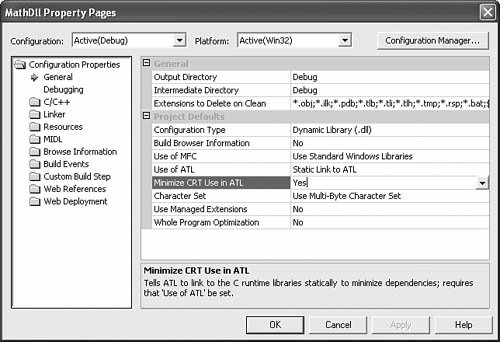
Setting Minimize CRT Use in ATL causes _ATL_MIN_CRT to be defined and keeps your server from
linking with the CRT. It’s important to realize that ATL does not
make available all the functions that the CRT provides when this
option is in use. If you happen to use a function that requires the
CRT when _ATL_MIN_CRT is defined, you’ll get the following
somewhat cryptic linker error:
1LIBCMT.LIB(crt0.obj) : error LNK2001:
2unresolved external symbol _main
In ATL 3 and earlier, using _ATL_MIN_CRT left
out one very important feature of the CRT: static and global object
initialization. Global and static objects would not have their constructors or destructors
called. Thankfully, ATL 7 and later provide an implementation of
this feature even without CRT support. Inproc ATL servers include
an implementation of _DllMainCRTStartup that invokes
global constructors and destructors. ATL itself relies upon global
constructors and destructors in many key places throughout the
framework. For instance, in the discussion of ObjectMain presented earlier in this chapter, I told you that ATL invokes ObjectMain when a server initializes without explaining
precisely how this was done. With global constructors available
both with and without _ATL_MIN_CRT defined, ATL is
perfectly safe to invoke the ObjectMain methods of each
class in the object map by using the constructor of the global CAtlModule instance:
 1template <class T>
 2class ATL_NO_VTABLE CAtlDllModuleT : public CAtlModuleT<T> {
 3public :
 4    CAtlDllModuleT() {
 5        _AtlComModule.ExecuteObjectMain(true);
 6    }
 7
 8    ~CAtlDllModuleT() {
 9        _AtlComModule.ExecuteObjectMain(false);
10    }
11    ...
12}
Summary
The object map is the primary data table that
the CAtlModule-derived _AtlModule object uses to
register and unregister the classes in the server. CAtlModule provides numerous helper methods you can use to
register and unregister your server, the classes in the server, and
the component categories in the classes.
An ATL server creates a class factory for a
class, as needed, using the class-creator function entry in the
object map. This class factory then creates instances of the class
using the instance-creator function entry in the object map.
Typically, you inherit a default specification for the
implementation of these two creator classes when you derive your
class from CComCoClass. However, with the appropriate
macro entries in your class, you can override these defaults and
provide a custom class factory and custom instance creator
function.
CComCoClass has some useful utility
functions for reporting rich errors to a client using the COM ErrorInfo protocol. The class also has convenient
instantiation methods that create an instance and query for the
proper interface based on the type of the provided interface
pointer variable.